

A package manager for ABAP. Finally!
Install, maintain, and publish ABAP packages. Stop reinventing the wheel. The package manager for the ABAP ecosystem is here.
Free playground · No credit card required
ABAP is the only major language without a native package manager
Every other language has one. JavaScript has npm. Python has pip. Java has Maven. Rust has Cargo. ABAP developers have abapGit but that is not a package manager.
abapGit is not enough
abapGit is great but you want more: version your packages, manage dependencies, publish, deprecate, ... just like npm but for ABAP.
Locked into SAP internals
Everyone depends on unreleased SAP APIs and internal features. When SAP changes something, upgrades become hard. This is the clean core dilemma.
Reinventing the wheel
The same URL parser, the same conversion utilities, the same string functions. Built thousands of times across SAP customers and partners. Wasted effort, every single time.
Until now.
A category of one
This has never existed before
apm is new category: a package manager written in ABAP and a registry built from the ground up for you and the ABAP community.
Package manager
The apm client. An ABAP report that runs in your SAP system. Install, publish, manage dependencies, and more.
Registry
The central place where ABAP packages are published and shared. Full-text search package name, readme documentation, and manifests.
Community
Share your packages with other ABAP devs. Use what others built for you. The human connection matters. This is what open source is all about.
abapGit vs. apm
Two tools, two jobs. They work together—but they are not interchangeable.
| Aspect | abapGit | apm |
|---|---|---|
| Primary purpose | Version control for ABAP source code and objects in Git repositories | Package manager for installing, updating, and publishing ABAP packages |
| What it manages | Commits, branches, merges, history, and collaboration on ABAP code and object changes | Package versions, dependencies, and package publishing, installation, and update |
| Main unit of work | A repository of ABAP files and their change history | A package (with all code and objects) and its dependency tree |
| Typical use | Save versions of ABAP code and objects, coordinate work among developers, revert changes | Install packages from the registry, or add reusable packages (modules) to a project; update packages to the latest version, and share your own packages with the community |
| Can it store project history? | Yes, that is its core job | No, not in the Git sense |
| Can it install dependencies? | Limited (APACK) | Yes, that is its core job |
| Can it publish packages? | Not as a package registry tool | Yes, via the apm registry |
| Can it branch and merge work? | Yes | No, not as a version control system |
| Can it track who changed what and when? | Yes | Not in source-control terms |
| Can it manage code distribution? | Only indirectly, by hosting repos | Yes, through package publishing and installation |
| Typical command examples | clone,commit,stage,merge,pull | install,update,publish,deprecate |
Why they are different
- abapGit is for tracking ABAP code over time.
- apm is for managing reusable ABAP software packages.
Why one can't do the other's job
- abapGit cannot replace apm because abapGit does not understand package dependency resolution, version ranges, registry publishing, or install workflows (APACK was a nice try).
- apm cannot replace abapGit because apm does not provide commit history, branching, merging, or source control collaboration.
Simple analogy
- abapGit is like the history and edit tracking system for your project.
- apm is like the delivery and installation system for reusable ABAP packages.
Bottom line
You can use abapGitand apm separately or together.
From zero to package
Get started immediately. No complex setup required.
One ABAP program is all you need.
Download
Download the apm client, a standalone ABAP program. Implement and activate it in your SAP system.
Works with SAP Basis 7.50 and higher (downport is planned)
Install packages
Browse the registry, find packages you want to use, and install them with a few clicks. Dependencies are resolved automatically.
Just like npm install
Publish & share
Package your own ABAP code with a manifest, add a version number, and publish to the registry. The world can now use your work.
Semantic versioning included
{
  "name": "@acme/my-awesome-app",
  "version": "1.0.0",
  "description": "My first ABAP package",
  "dependencies": {
    "@apm/markdown": "^1.0.0",
    "@apm/url": "^1.0.1",
    "@apm/http-agent": "^1.2.0"
  }
}
OK, OK, timeout!
Let's set some expectations:
apm is not the same as npm. Just like ABAP isn't JavaScript.
In ABAP, you have one global package tree. This limits which dependencies can be installed.
However, apm supports vendoring of so called ABAP modules and you can bundle such dependencies into your project independently of the global tree and even across ABAP namespaces. Currently, ABAP modules may include classes and interfaces but support for other object types is planned.
Of course, apm is new. Expect some hick-ups and keep the feedback coming!
Everything you need to share ABAP code
Built with the ABAP ecosystem in mind. Inspired by npm, designed for ABAP.
Package management
Install, version, and publish ABAP packages with a single click. A central registry for all your ABAP apps and modules.
Semantic versioning
Full semver support with version ranges. Protect against breaking changes. Use ^, ~, or exact versions for dependencies.
Dependency resolution
Declare your dependencies in a manifest. apm resolves and installs them automatically. No more manual tracking.
npm-like schema
package.abap.json is based on the same schema as npm. Familiar to you if you have worked with JavaScript or TypeScript.
Scoped packages
Organize packages by organization with @scope/package naming. Enterprises can publish under their own namespace.
Bundling & vendoring
Ship your app with all dependencies included. Bundle packages into your own namespace for complete independence.
Clean core enablement
Stop depending on unreleased SAP APIs. Use versioned, community-maintained packages instead. Future-proof your code.
Private registries
Run your own inner-source registry behind the firewall. Share code across ABAP systems within your enterprise.
Use and build packages with ease
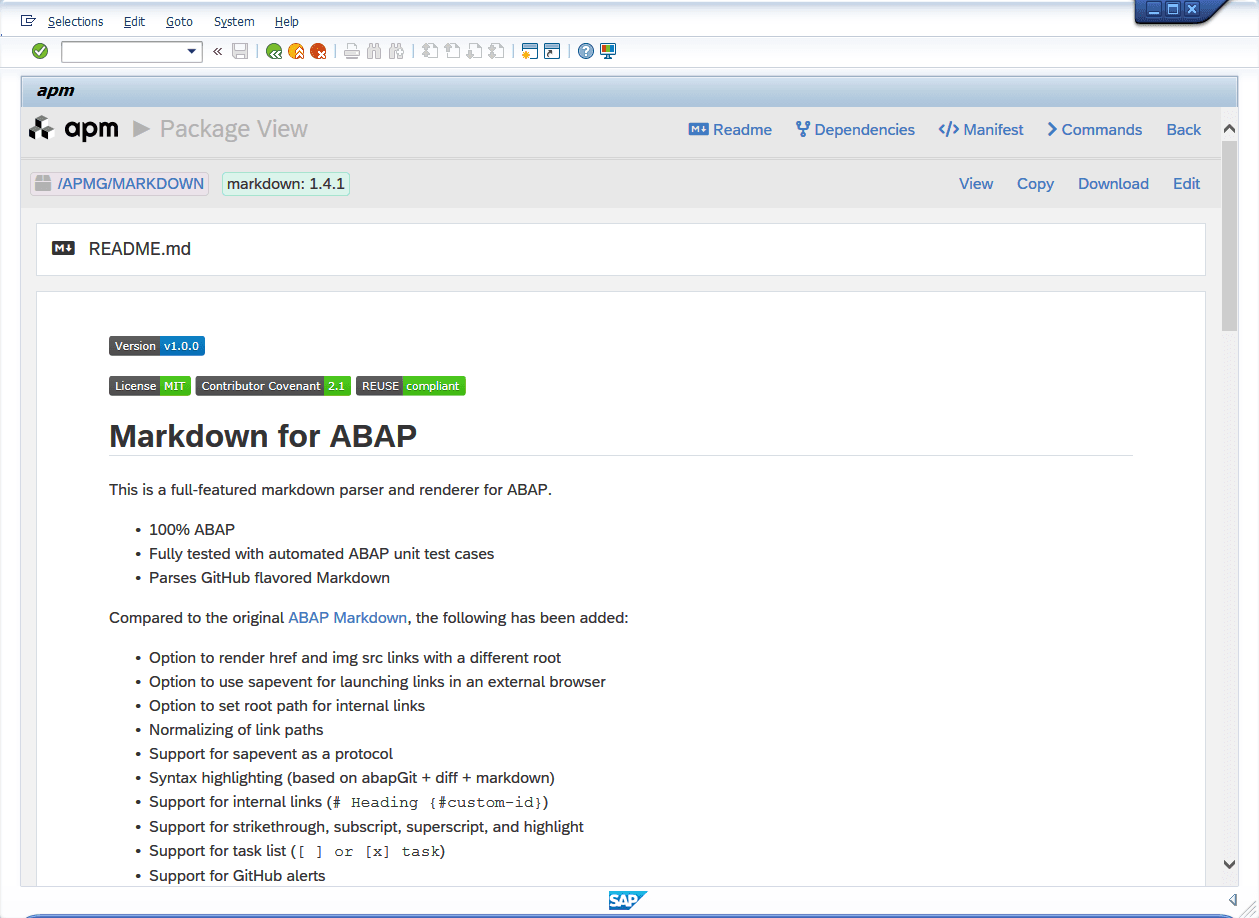
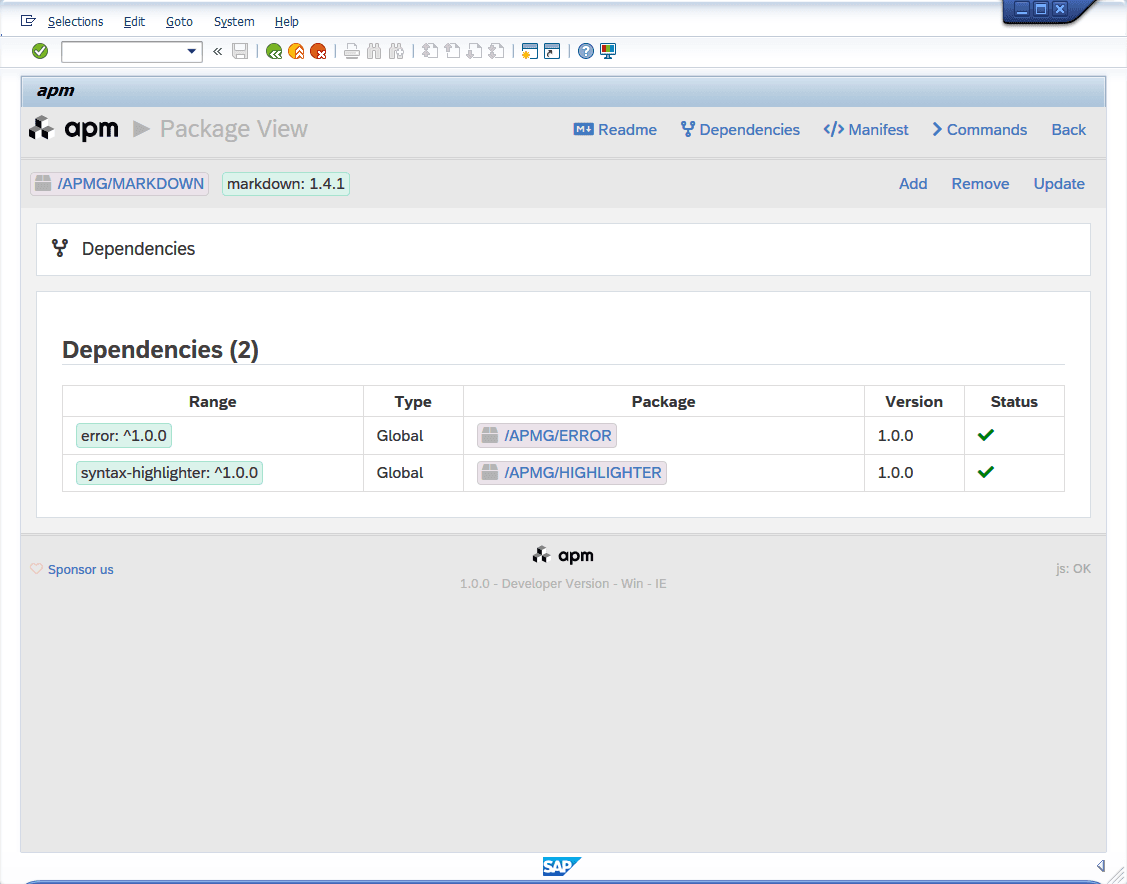
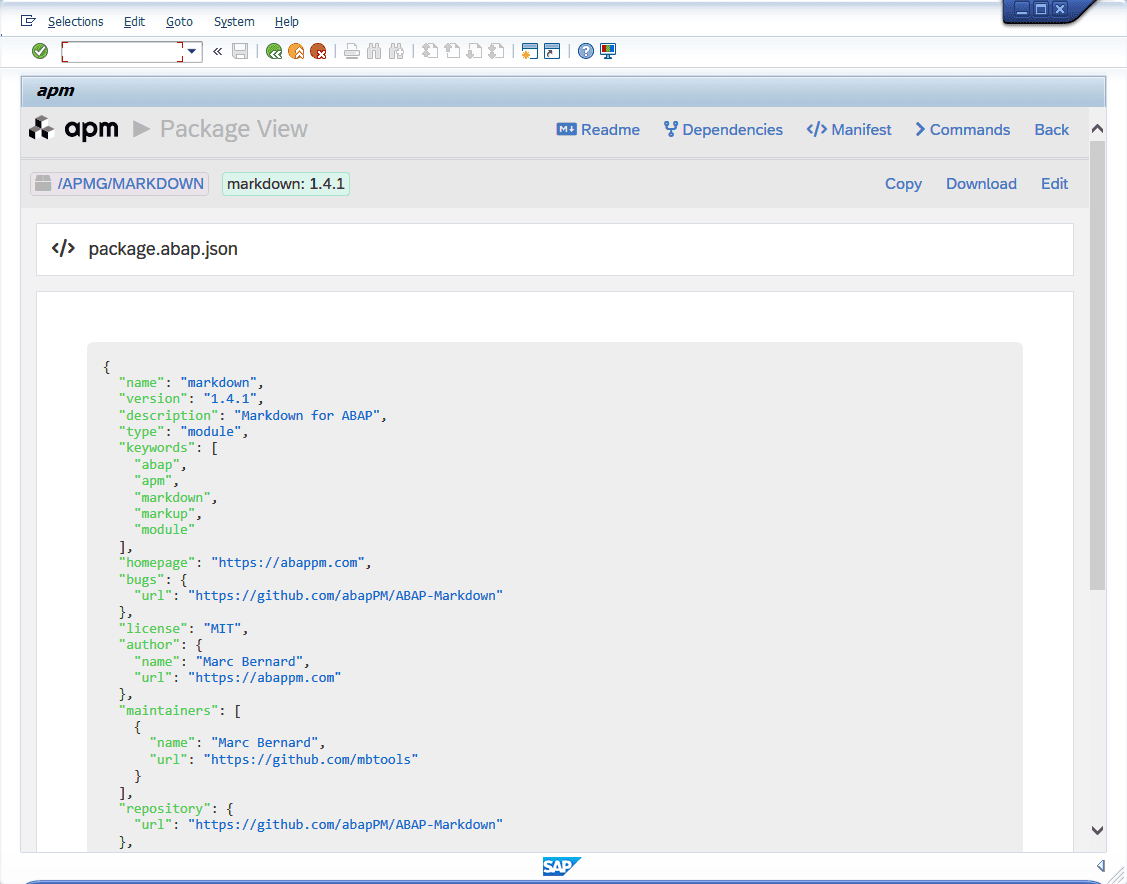
Browse and edit readme, manifest, and dependencies
— all within the apm client in your ABAP system.
Readme
View the package documentation with features, enhancements, and metadata badges—everything you need to evaluate a package before installing.
Dependencies
See the dependency tree with version ranges, types, and install status at a glance. Add, remove, update.
Manifest
Inspect and maintain the package.abap.json manifest: name, version, license, maintainers, and repository details.
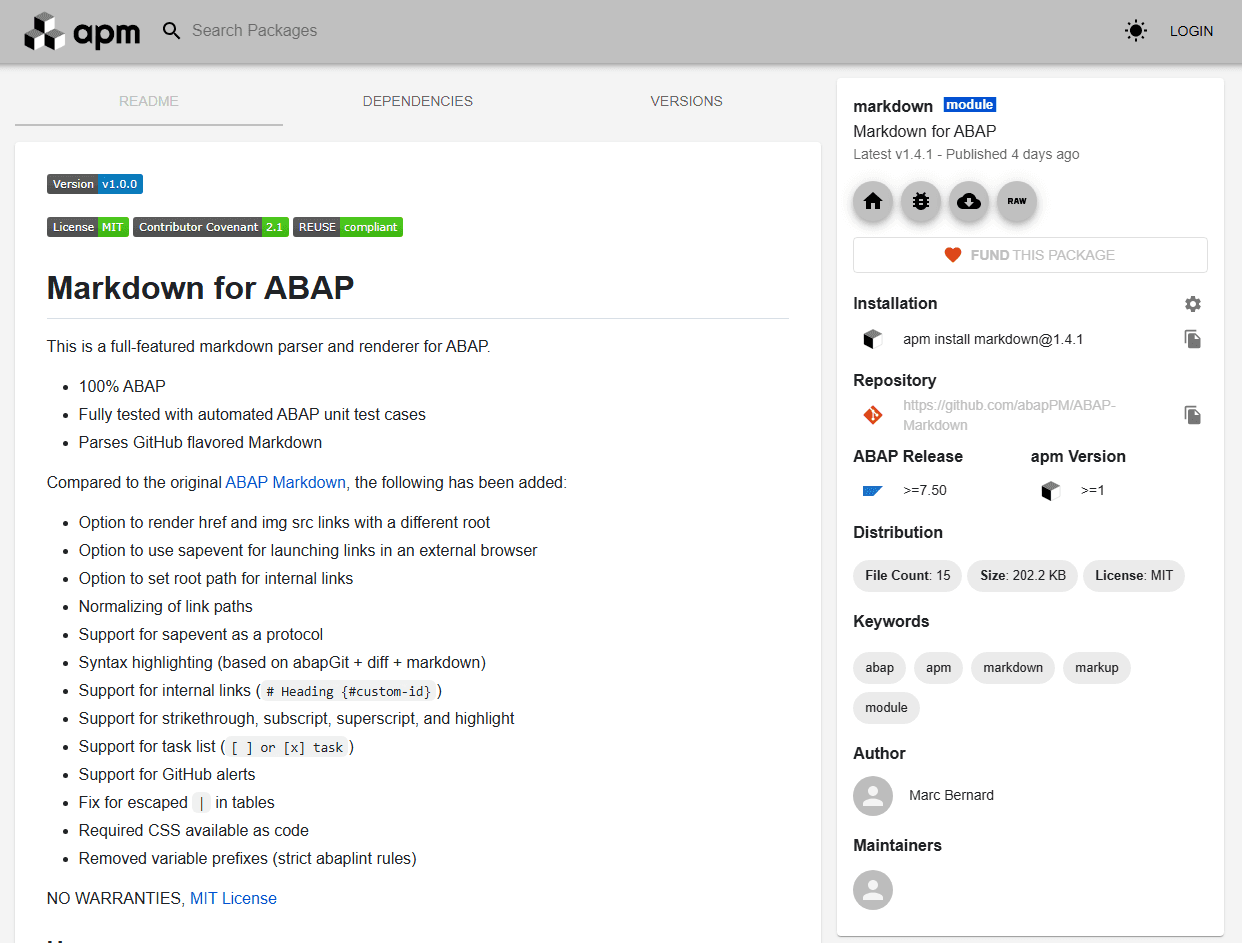
Registry
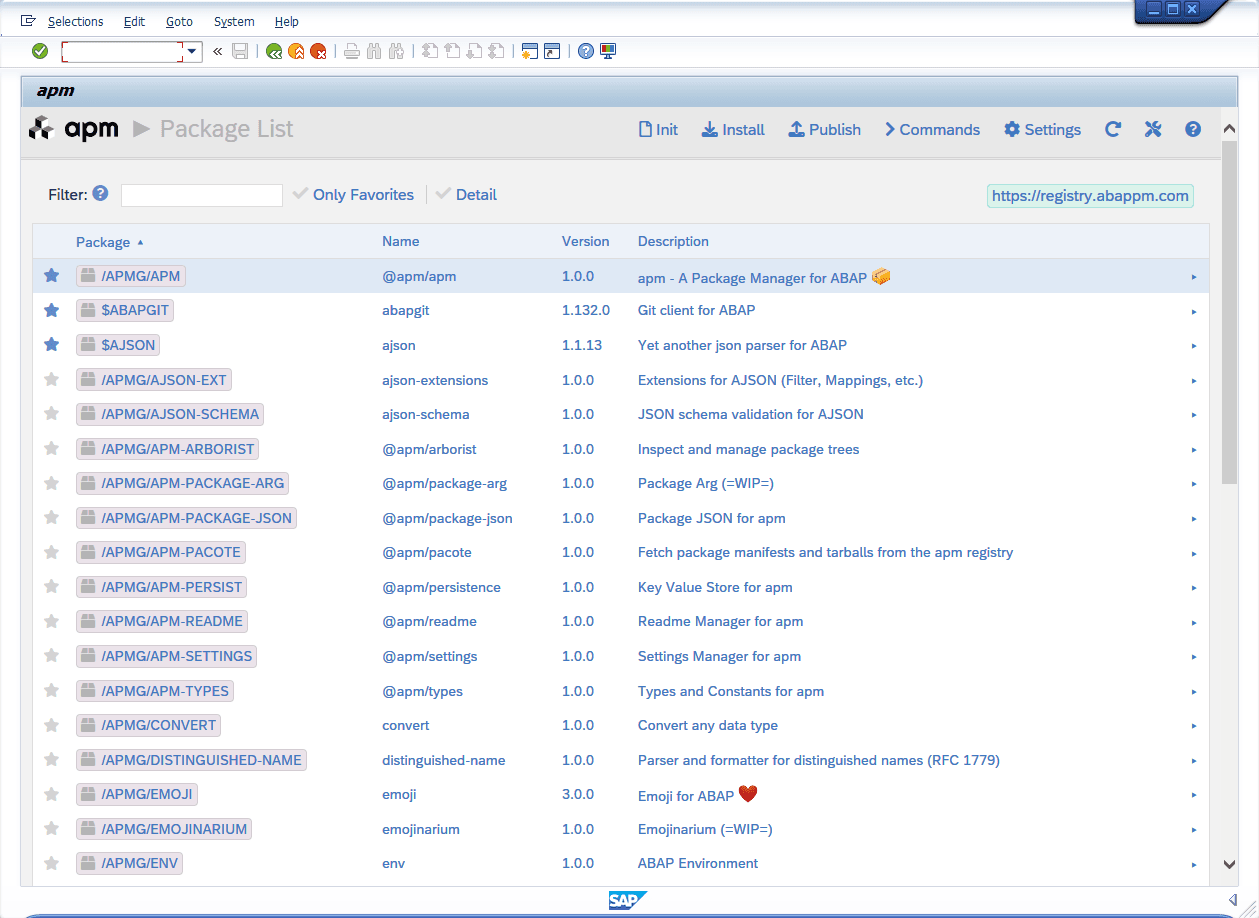
Browse all published packages in the registry, search by keywords, and see package details at a glance.
Built by ABAP developers,
for ABAP developers
30 years of SAP ecosystem experience distilled into a tool you always dreamt of.
Familiar workflow
Know npm? apm works the same. Same concepts and manifest format, but made and tuned for ABAP.
One report, everything included
The apm client is a single standalone ABAP report. Download it, upload it, activate it. You are ready to go.
SAP GUI & Eclipse ADT support
apm works in SAP GUI with a full-featured UI. ADT support is on the roadmap. Use whatever environment you prefer.
Built on abapGit
apm leverages the battle-tested HTML UI and serialization engine from abapGit. 10+ years of community trust, built right in.
Open source, MIT license
The ABAP client is 100% open source. We welcome your contributions and feedback whether you are a beginner or an expert.
AI-ready ecosystem
Just as AI uses npm packages to build apps, a rich ABAP package ecosystem will unlock AI-powered ABAP development.
See apm in action
Watch presentations and live demos from conferences and podcasts.

Show and Tell: ABAP Package Manager
Marc walks through the complete apm workflow with live demos. Boring Enterprise Nerds podcast.
apm – From Vision to Reality
The journey from idea to working product. Presented at ABAPConf Global 2024.

abapGit & apm – Taking Development to the Next Level
How abapGit and apm work together to enable open-source ABAP development.

Addressing the Future of ABAP: The Power of Open Source
The original announcement of apm at ABAPConf Europe 2024.
Simple, transparent pricing
The apm client is open source and free forever. The registry is a hosted service with simple per-user pricing.
Playground
Experiment with apm in your own sandbox environment. Install, publish, and unpublish packages freely.
- Playground registry (playground.abappm.com)
- Full apm client functionality
- Install packages from the playground
- Publish packages to the playground
- Playground data may reset occasionally
Production
or €80/user/year (2 month free)
The full apm experience with the global registry. Publish real packages. Build real applications. Unlimited.
- Global registry
(registry.abappm.com) - No pricing tiers
- Same low price for everyone
- GitHub support
- Organization & scoped packages (planned)
- Private packages (planned)
Enterprise
Self-host a private registry inside your firewall. Share packages across ABAP systems within your enterprise.
- Private inner-source registry
- Proxy to global registry (optional)
- Unlimited users
- Priority support
- Single sign-on (t.b.d.)
- Team permissions (t.b.d.)
Ready to try apm?
Download the ABAP apm client, install it in your ABAP sandbox system, and start installing or publishing packages. It takes less than 15 minutes. Promise!
This site is protected by reCAPTCHA.